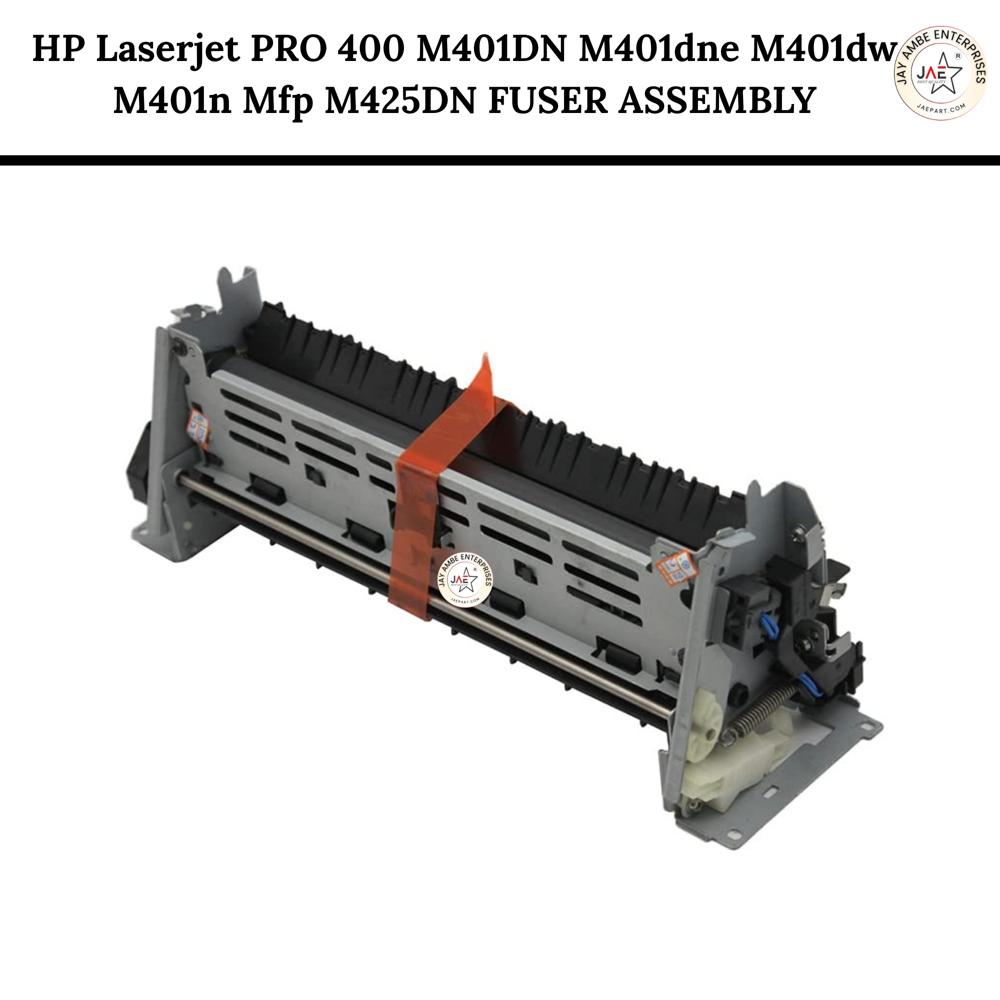
HP Laserjet PRO 400 M401DN M401dne M401dw M401n Mfp M425DN Fuser Unit (RM1-8809-0000)
HP Laserjet PRO 400 M401DN M401dne M401dw M401n Mfp M425DN Fuser Unit (RM1-8809-0000)
HP Laserjet PRO 400 M401DN M401dne M401dw M401n Mfp M425DN Fuser Unit (RM1-8809-0000) Specification
Color
Black
Paper Size
A4, Letter
Weight
Approx. 700g
Pattern
OEM Replacement
Product Type
Fuser Unit
Outer Diameter
Approx. 8 cm
Ink Type
Not applicable (Toner-based)
Noise Level
Low (dependent on printer)
Model No
RM1-8809-0000
Year Built
2023
Capacity
Up to 100,000 pages (estimated)
Storage Instructions
Store in a cool, dry place, away from direct sunlight
Size
Standard Fuser Assembly Size
Print Technology
Laser
Height
Approx. 13 cm
For Use In
HP LaserJet PRO 400 M401DN, M401dne, M401dw, M401n, and MFP M425DN printers
Lead Time
2-7 working days
Compatible Brand
HP
Power Source
Electrical (printer powered)
Printing Speed
Up to 35 ppm (printer dependent)
Printer Type
Laserjet
Inner Diameter
Approx. 4 cm
Features
Easy installation, long-life, high performance
Part Number
RM1-8809
Installation
Professional installation recommended
Humidity Range
20% - 80% RH
Compatible Printers
HP LaserJet Pro 400 Series
Condition
New, Original OEM
Lifecycle
Typical fuser life up to 100,000 pages under standard conditions
Replacement Cycle
Replace after end-of-life error or image defects
Packaging
Individually boxed for protection
Operating Temperature
10C - 32.5C
About HP Laserjet PRO 400 M401DN M401dne M401dw M401n Mfp M425DN Fuser Unit (RM1-8809-0000)
The fuser assembly for the HP LaserJet Pro 400 series, including models M401dn,M401dne, M401dw, M401n, and MFP M425dn, is a critical internal component responsible for permanently bonding toner to paper using a combination of high heat and pressure. It is typically identified by part numbers RM1-8809 (220V/240V for international/Indian use) or RM1-8808 (110V/120V for US use).
Detailed Product Description
This heat-based assembly is an essential replacement part for maintaining professional print quality and printer longevity.
Core Functionality: It uses a pre-installed heating roller and a pressure roller to melt toner particles into the paper fibers.
Performance Metrics: Designed for heavy-duty environments, it supports a duty cycle of approximately 50,000 to 100,000 pages before requiring replacement.
System Reliability: Installing a new fuser unit is the primary solution for resolving common errors such as "Fuser Error," persistent paper jams in the rear section, smudging, or toner that rubs off the page.
Technical Specifications
Attribute
Specification
Compatible Models
HP LaserJet Pro 400 M401 (a/d/n/dn/dw/dne), MFP M425dn, M425dw
Part Numbers
RM1-8809-000CN (220V), RM1-8808-000CN (110V)
Voltage
220240V AC (+/- 10%) or 110127V AC
Technology
Heat-based Laser Fusing
Yield
Approx. 50,000 to 100,000 pages
Weight
Approximately 500g to 2kg depending on packaging and variant
Genuine HP OEM Fuser Unit for LaserJet Pro 400 Series
This fuser unit is manufactured to original HP specifications, ensuring reliability, precise performance, and consistent print quality. Its robust construction is designed for professional environments, providing seamless integration with LaserJet Pro 400 series models. Trust in a product built to OEM standards for hassle-free operation and superior results.
Optimal Performance and Longevity
Engineered for a lifecycle of up to 100,000 pages, this fuser minimizes downtime and maintenance. Suitable for high-volume printing, its performance remains stable under various temperatures and humidity levels. Replace the fuser at the first sign of image defects or when the printer issues an end-of-life warning, ensuring crisp results and reliable throughput.
Easy and Secure Installation Process
Packaged individually in a protective box, this fuser is designed for straightforward handling. While installation can be done by experienced users, professional installation is recommended to ensure proper alignment and avoid printer damage. Detailed storage and handling instructions are included to help you maintain the fuser's pristine condition until use.
FAQ's of HP Laserjet PRO 400 M401DN M401dne M401dw M401n Mfp M425DN Fuser Unit (RM1-8809-0000):
Q: How do I know when to replace the HP LaserJet PRO 400 fuser unit (RM1-8809-0000)?
A: You should replace the fuser unit when your printer displays an end-of-life error or if you start noticing consistent image defects, such as smudges or unfused toner on prints. Regular replacement ensures optimal print quality and printer longevity.
Q: What printers are compatible with the RM1-8809-0000 fuser unit?
A: This fuser is designed for use in HP LaserJet PRO 400 models including M401DN, M401dne, M401dw, M401n, and MFP M425DN. Always confirm your printer model before purchasing for smooth compatibility.
Q: Where should I store the fuser unit before installation?
A: Store the fuser unit in a cool, dry place away from direct sunlight and humidity. Proper storage helps preserve the unit's condition and extends its shelf life before use.
Q: What is the installation process for the HP fuser unit, and is professional installation required?
A: While the fuser is built for easy installation, it's strongly recommended to have it installed by a professional technician. Correct installation ensures proper alignment, prevents damage to your printer, and maintains consistent print performance.
Q: What is the lifespan and printing capacity of the RM1-8809 fuser?
A: Under standard conditions, the typical fuser life is up to 100,000 pages. Printing volume, paper type, and environmental conditions can affect the actual lifespan.
Q: How does replacing the fuser unit benefit my printer's performance?
A: Replacing your fuser restores optimal print quality, prevents image defects, and helps maintain efficient printer operation, reducing the risk of downtime or costly repairs.
Q: What safety and usage instructions should I follow when handling the fuser?
A: Allow the printer and old fuser to cool before replacement. Handle the new fuser carefully, following the included guidelines, and ensure it is securely fitted to avoid operational issues.
Tell us about your requirement
Price:
Quantity
Select Unit
50
100
200
250
500
1000+
Additional detail
Mobile number
Email
Name
Comapny Name
Phone Number
Email Id
City / State
Confirm Your Requirement
Verification Code
Did not receive yet?
Resend OTP
You’re Done!
We have received your requirements and will reply shortly with the best price.
 Maharashtra, India










 Send Inquiry
 Send Inquiry
 Send SMS
