About KYOSORA 2040 THERMISTER
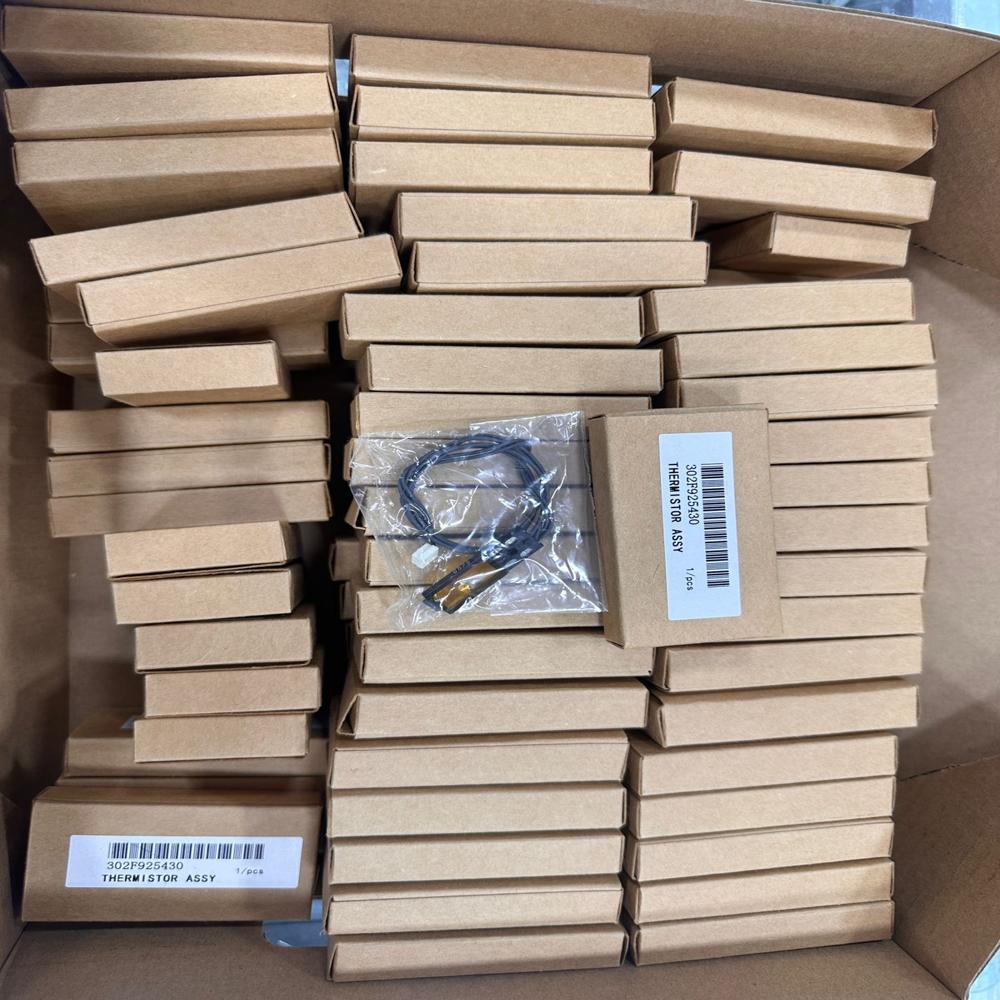
Discover the featured KYOSORA 2040 THERMISTER-an enviable component designed for resplendent performance in fuser unit temperature control. This terrific thermistor (OEM Part Number: 302FP925430) is built for KYOSORA 2040 Series laser printers, promising high accuracy and durable usage. Personalise your printer maintenance with this OEM-equivalent plug-in solution, tailored for easy replacement and superior reliability. Each individual boxed unit comes ready for immediate dispatch, with a generous discount for bulk orders. Ensure seamless operation and lasting efficiency with this silent, black-cased replacement part.
Advanced Application and Plant Performance
KYOSORA 2040 THERMISTER excels in fuser unit temperature regulation, crucial for flawless laser printing. Perfect for replacement and repair of KYOSORA 2040 series printers, its terrific accuracy and OEM-equivalent build make it an enviable asset in plant environments requiring stable print technology. The thermistor's robust cable and standard connectivity support hassle-free integration, ensuring your production floor operates at resplendent efficiency while enhancing the durability of your print systems.
Payment, Delivery, and Export Market Benefits
Enjoy convenient and secure payment terms when ordering the KYOSORA 2040 THERMISTER. With ready stock and immediate dispatching, customers are assured swift delivery, minimizing downtime. We cater to varied export markets, providing reliable arrival and resplendent market value worldwide. Benefit from our commitment to speedy logistics-your thermistor unit arrives promptly, maintaining your workflow momentum and ensuring that your fuser units function seamlessly without interruption.
FAQ's of KYOSORA 2040 THERMISTER:
Q: How do I install the KYOSORA 2040 THERMISTER in my printer?
A: To install the KYOSORA 2040 THERMISTER, simply plug the connector into your printer's mainboard according to the instructions provided. Ensure the component is securely mounted within the fuser unit area before reassembling your printer.
Q: What makes this thermistor a terrific replacement for my printer?
A: The KYOSORA 2040 THERMISTER offers high accuracy, easy replacement, and is OEM-equivalent. Its durability and silent operation ensure optimal performance, making it a resplendent choice for maintaining consistent print quality in KYOSORA 2040 printers.
Q: When will my KYOSORA 2040 THERMISTER be dispatched after purchase?
A: Your order will be dispatched immediately from ready stock, ensuring prompt delivery and minimal wait time, so you can quickly restore your printer's functionality.
Q: Where should the thermistor be stored before installation?
A: For best results, store the KYOSORA 2040 THERMISTER in a dry, cool place and avoid static exposure. This preserves the sensor's integrity and maximizes longevity prior to usage.
Q: What is the process for replacing a faulty thermistor?
A: First, power off your printer and unplug it. Remove the old thermistor from the fuser unit, then insert the new KYOSORA 2040 THERMISTER by plugging its connector into the mainboard. Secure all parts and restart the printer to complete the process.
Q: What benefits does this thermistor bring to my printing setup?
A: Using this high-quality OEM-equivalent thermistor ensures consistent temperature management, prolongs your fuser unit's lifespan, and maintains enviable print performance. Its reliable design and availability enhance maintenance efficiency.
 Maharashtra, India








 Send Inquiry
 Send Inquiry
 Send SMS
 Call Me Free