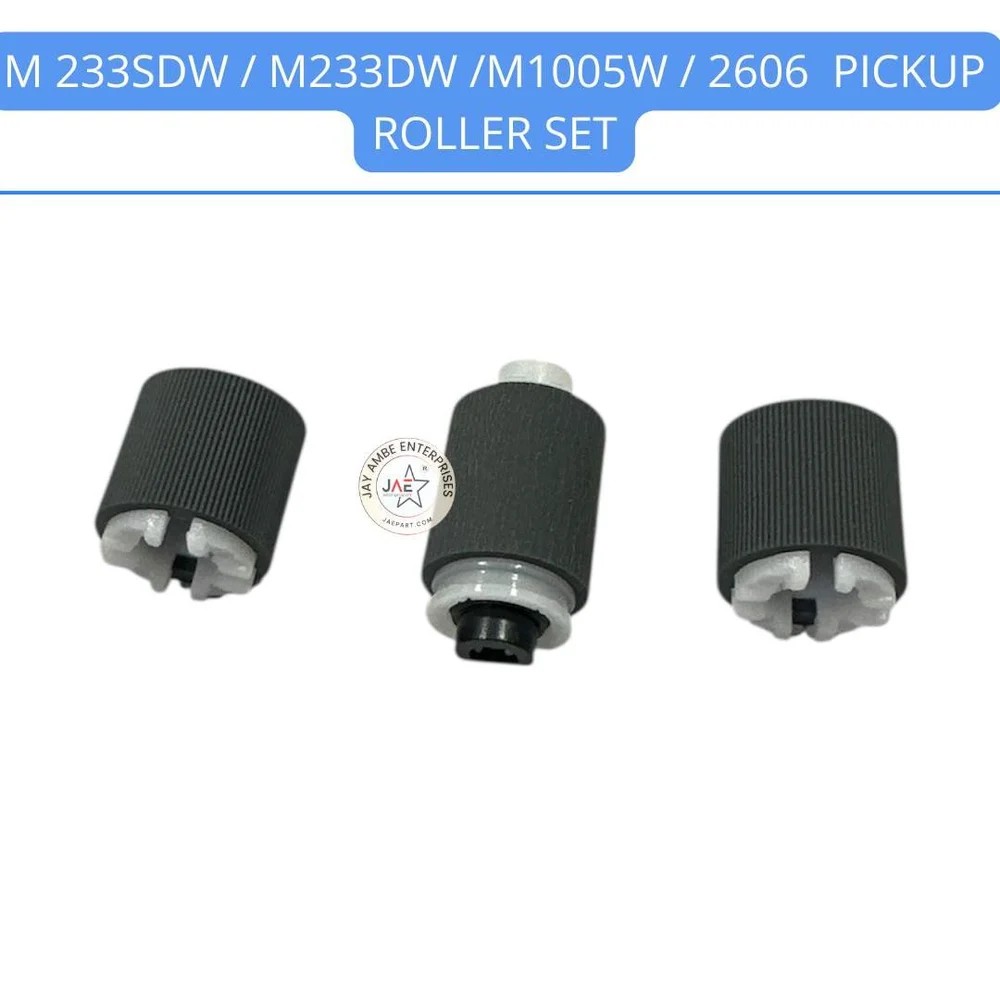
Hp 233sdw / 233dw /1005w /2606 Pickup Roller Specification
Year Built
2023
Storage Instructions
Store in a cool, dry place
Model No
233sdw/233dw/1005w/2606 Pickup Roller
Printer Type
Laser Printer
Inner Diameter
12 mm
For Use In
HP LaserJet MFP 233sdw, 233dw, 1005w, 2606 Series
Capacity
Standard Duty
Size
Standard
Outer Diameter
19 mm
Noise Level
Silent Operation
Print Technology
Laser
Paper Size
A4, Letter
Features
High Durability, Consistent Paper Pickup, Easy Installation
Lead Time
1-3 Days
Pattern
OEM Fit
Weight
Approx. 10 g
Compatible Brand
HP
Height
32 mm
Product Type
Pickup Roller
Color
Gray
Temperature Tolerance
0C to 50C
Installation Position
Input Tray Pickup Assembly
OEM/Compatible
Compatible
Material
Premium Rubber with Polycarbonate Core
Application
Replacement Part for Pickup Mechanism
Reusability
Replaceable, Non-Reusable
Surface Design
Micro-Grooved for Better Grip
About Hp 233sdw / 233dw /1005w /2606 Pickup Roller
The HP LaserJet M233sdw / M233dw / 1005w / 2606 Pickup Roller is a critical replacement component designed to restore reliable paper feeding and prevent common printing issues such as paper jams, misfeeds, and pick-up failures. These rollers are typically sold in sets or as part of a pickup assembly that includes a separation pad.
Core Product Specifications
Material: High-quality textured rubber for optimal grip.
Durability: Precision-engineered to withstand thousands of print cycles in busy office environments.
Position: Tray 2 Pickup Roller.
Dimensions & Weight: Approximately 15X10X5 cm with a weight of roughly 0.4 kg for a complete set.
Duty Cycle: Designed for an estimated capacity of up to 2,000 pages.
Key Features
Restores Performance:Specifically engineered to replace worn, smooth, or cracked rollers that cause the printer to fail to "grab" paper from the tray.
Enhanced Grip:Features a textured surface that ensures consistent friction against the paper for smooth feeding.
Broad Compatibility: Fits a wide range of HP LaserJet and LaserJet Tank models, as well as several Canon imageCLASS devices.
Wide Device Compatibility
These rollers are compatible with the following series and models:
HP LaserJet Tank MFP:1005, 1005w, 2606dn, 2606sdw, 1602a, 1602w, 1604w,2602dn/sdn/sdw, 2603dn/sdn/sdw, 2604dn/sdn/sdw, and 2605dsw.
HP LaserJet MFP:M233sdw, M233dw, M233sdn, M208dw, M209dw, M211d, M232dw,M234dw, M234sdw, M236dw, and M236sdn.
With a micro-grooved surface design, the HP 233sdw/233dw/1005w/2606 Pickup Roller provides superior paper grip and smooth feeding in compatible laser printers. Its premium construction minimizes paper jams, delivering a dependable and consistent paper pickup every time, ensuring optimal functionality for high-throughput environments.
Easy, Hassle-Free Installation
This replacement roller is designed for quick and effortless installation in the input tray pickup assembly of compatible HP LaserJet printers. Detailed guidance is typically included or available from your supplier, making it suitable for dealers, retailers, and end-users alike-no complex tools or procedures required.
Durable and Reliable for Everyday Printing
Crafted from premium rubber with a polycarbonate core, this pickup roller stands up to regular use, providing high durability under standard duty cycles. It operates silently and efficiently, supporting A4 and Letter paper sizes while maintaining steady performance even in variable temperature conditions.
FAQ's of Hp 233sdw / 233dw /1005w /2606 Pickup Roller:
Q: How do I install the HP 233sdw/233dw/1005w/2606 Pickup Roller?
A: To install the replacement pickup roller, simply access the input tray pickup assembly in your HP LaserJet MFP 233sdw, 233dw, 1005w, or 2606 printer, remove the old roller, and snap the new one into place. No specialized tools are required. Installation instructions can usually be found in the printer's user manual.
Q: What printer models are compatible with this pickup roller?
A: This pickup roller is designed specifically for HP LaserJet MFP 233sdw, 233dw, 1005w, and 2606 series printers, ensuring precise OEM fit and reliable performance within these models.
Q: When should I replace my printer's pickup roller?
A: Replace the pickup roller when you notice frequent paper jams, inconsistent feeding, or visible wear on the roller's surface. Regular replacement helps maintain reliable printing and minimizes downtime.
Q: Where is the pickup roller installed in the printer?
A: The pickup roller is installed in the input tray pickup assembly, which is accessible from the front or bottom section of your HP printer. Always consult your printer manual for exact installation guidance.
Q: What materials are used in this pickup roller, and how does it benefit my printer?
A: The roller is constructed from premium rubber and a polycarbonate core, with a micro-grooved surface for better grip. This design ensures consistent paper handling, reduces paper jams, and prolongs the efficiency of your laser printer.
Q: How should this roller be stored before installation?
A: Store the replacement roller in a cool, dry place to maintain its material integrity and performance. Avoid exposing it to direct sunlight or extreme humidity.
Q: What are the key benefits of using this compatible pickup roller?
A: This roller offers easy installation, silent operation, high durability, and precise fit-all with reliable performance for standard duty cycles. It ensures consistent paper pickup, helping your HP printer operate smoothly and efficiently.
Tell us about your requirement
Price:
Quantity
Select Unit
50
100
200
250
500
1000+
Additional detail
Mobile number
Email
Name
Comapny Name
Phone Number
Email Id
City / State
Confirm Your Requirement
Verification Code
Did not receive yet?
Resend OTP
You’re Done!
We have received your requirements and will reply shortly with the best price.
 Maharashtra, India







 Send Inquiry
 Send Inquiry
 Send SMS